
Yes. The whole comparison is free and no account is needed: the grid, the redline view, the pane layouts, and the sorting, ignore, and normalization settings. Exporting the result as a PDF or an Excel file is a Pro feature.
Compare Excel files and other spreadsheets
Find the difference between two excel files and other spreadsheets!
File formats: xls/xlsx/xlsm/xlsb, csv, txt, dif, ods.
Browse
Browse
Compare Excel files cell by cell
Diffchecker runs an XLSX diff in your browser. Upload two spreadsheets and every added, removed, and edited cell is marked in place, with rows kept aligned when one file has an insertion the other does not.
Everything in the spreadsheet diff tool
Compare spreadsheets cell by cell and sheet by sheet, with each file's metadata alongside.
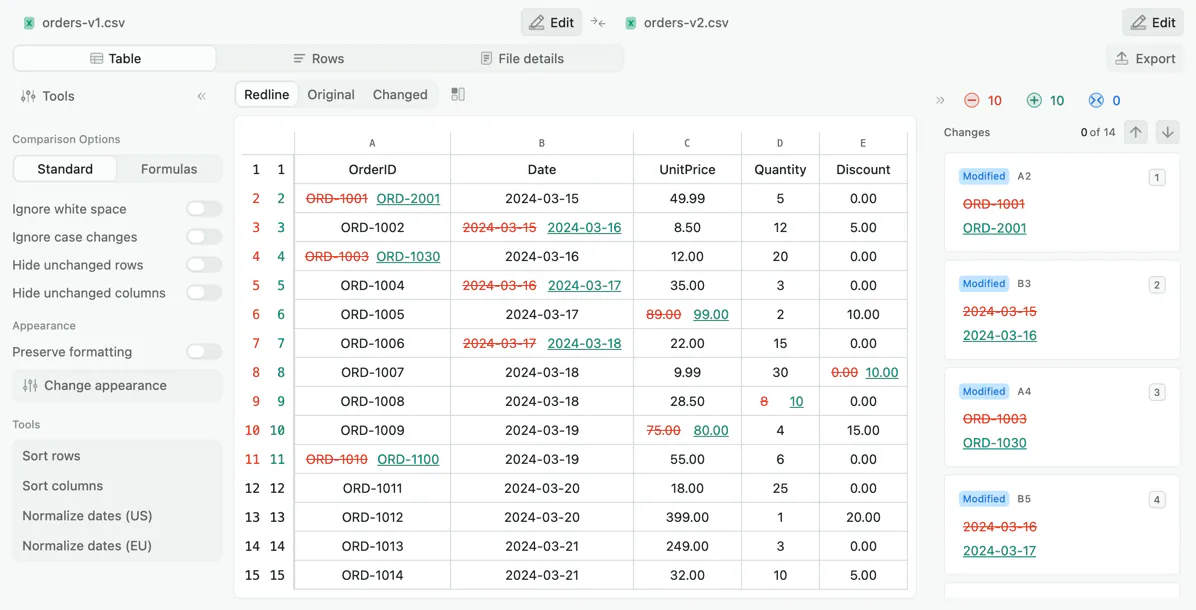
Table view
The default view: both spreadsheets as grids with every changed cell highlighted in place, added rows in green, and removed rows in red. Row and column alignment is preserved, so inserting a row near the top does not shift everything below out of correspondence.
File details
Puts the two files' metadata side by side: author, size, format, sheet count, and sheet names.
Sheet by sheet
Choose which sheet to compare on each side. Sheets that are identical in both files are marked unchanged, so you can go straight to the ones that differ.
No sign-up to compare
Drop two files and compare immediately. An account is only needed to save, share, or upgrade.
No file size limits
Compare large exports without trimming them down first.
Export as PDF or Excel
Export as a PDF for a review packet, or as a spreadsheet to keep working in. Available on Pro.
How to compare two Excel files online
- 1
Add the original file
Drag it onto the left panel, or click to browse. XLSX, XLS, CSV, TSV, and ODS all work.
- 2
Add the updated file
Do the same on the right. The two files do not need the same number of rows, columns, or sheets.
- 3
Review the changed cells
Changed cells are highlighted in place. Switch sheets with the picker on each file, and hide unchanged rows and columns to focus on the edits.
- 4
Export or share
Export the comparison as a PDF or an Excel file, or save it and send a link.
Why Diffchecker?
A cell can show the same number after its formula has changed completely. SUM(B2:B40) in one version and SUM(B2:B39) in the next might display the same figure this quarter and diverge the next. Diffchecker compares the formulas as well as the displayed values.
- A Formulas comparison mode, so an edited calculation shows up even when the result on screen is the same
- A redline view that merges both files into one grid, each changed cell showing its old value beside the new one
- Nine pane layouts, so the redline can sit beside the original file, the changed file, or both at once
- Hide unchanged rows and columns to collapse a thousand-row sheet down to the edits
- Date normalization in US or EU order, so 09/17/2024 and 2024-09-17 stop counting as a difference
- Ignore case and whitespace so trailing spaces from an export do not flood the result
Encrypted in transit
All traffic between your browser and Diffchecker is encrypted with TLS.
Offline on Desktop
Diffchecker Desktop compares files on your machine with no internet connection.
Independently certified
Your files are handled under an information security program certified to ISO/IEC 27001.
Visit our Trust Center
What people compare with Diffchecker
Finance and accounting
- Compare two versions of a budget or forecast model
- Check that a formula change did not alter a downstream total
- Review a reconciliation against last period's file
- Verify which line items changed in a revised quote
Data and analytics
- Compare two CSV exports to find added, removed, or edited rows
- Check a data cleanup pass touched only the intended cells
- Diff two report outputs generated from different queries
- Confirm a migration preserved every record
Operations and project teams
- Compare an updated price list against the published one
- Track what a collaborator changed in a shared tracker
- Review an inventory or roster between two dates
- Check a vendor's revised spreadsheet against the original
Formats you can compare
The two files do not have to be in the same format. A CSV export can be compared against the XLSX spreadsheet it came from, or against an ODS file.
Excel spreadsheets
Multi-sheet files, compared one sheet at a time, with the underlying calculations compared as well as the values on screen.
- .xlsx
- .xls
- .xlsm
- .xlsb
Delimited data
What database and reporting tools export, where the ignore and normalization settings matter most.
- .csv
- .tsv
- .txt
- .dif
Open formats
The OpenDocument format used by LibreOffice and OpenOffice, comparable against an Excel spreadsheet directly.
- .ods
No file size limit. Large spreadsheets take longer to render, and Diffchecker Desktop is faster because it runs locally.
Getting a cleaner comparison
Use these settings to focus on meaningful differences and arrange the result for review.
Compare rows in sorted order
Use Sort rows to choose a column. Both sheets are sorted in ascending order before the comparison is recomputed, so row matches and reported changes may change. Choose Original order to compare the unsorted sheets again.
Dates that are not really different
Apply date normalization, US or EU, from the tools panel. It rewrites both files' dates to one format, so 09/17/2024 and 2024-09-17 stop being reported as a change.
Trailing spaces and casing
Turn on ignore whitespace and ignore case. Data that passed through a form or a CSV export accumulates both.
A total changed but no cell did
Switch the comparison from Standard to Formulas. A cell is then reported when its underlying calculation was edited, even if the displayed result is identical.
A large sheet with a handful of edits
Hide unchanged rows and columns. A thousand-row sheet with six edits collapses to those six rows and the columns they sit in.
Trusted by teams and independently certified
- Intuit
- Lyft
- National Geographic
- Salesforce
- The Wall Street Journal
- Congressional Budget Office
- Zoom
- Dow Jones
ISO/IEC 27001 certified
Our information security management system is independently audited and certified. View the certificate in our Trust Center.
“Since the start of my career, Diffchecker has been my go-to for catching the kind of discrepancies you would never find on your own. And not finding them can sometimes lead to disastrous outcomes.”

Alexander CookeSenior Software Engineer, Workday
Frequently asked questions about comparing spreadsheets
Both. Switch the comparison from Standard to Formulas and a cell is reported when its underlying calculation changed, even if the displayed result is identical.
Row alignment is preserved across both sides, so inserting a row near the top marks that one row as added rather than reporting every row below it as changed.
Redline is the default layout of the table view: both spreadsheets merged into one grid, with added rows in green, removed rows in red, and each changed cell showing its old value next to the new one.
Yes. Ignore case and whitespace, and normalize dates in US or EU order so 09/17/2024 and 2024-09-17 are not reported as a difference. You can also hide unchanged rows and columns.
The comparison runs in your browser, and nothing is published or shared. Nobody else can see it unless you save the comparison and share the link. Diffchecker Desktop runs the same comparison offline.
More ways to compare with Diffchecker
Compare text
Compare text and code with word-level and character-level highlighting, syntax coloring, and merge.
Compare documents
Compare Word documents, PDFs, and presentations, including a PDF against a Word file, with formatting and moved-content detection.
Compare images
Nine comparison modes including slider, fade, flicker, and pixel subtraction, with automatic alignment.
Compare on the desktop
Compare whole folders and work fully offline on Windows, Mac, and Linux with the desktop app.
Compare without the browser
Diffchecker Desktop compares text, documents, images, spreadsheets, and whole folders on your machine, offline.
Try for Free!
14-day trial
No credit card required