
Yes. All nine views, alignment, the change log, OCR, and EXIF comparison work without signing up. PNG export is free to try and unlimited on Pro.
Compare Images
Find the difference between pictures or other images!
Enter two images and the difference will show up below.
Browse
Browse
Compare two images, pixel by pixel
Diffchecker is a free online image difference checker. Drop in two images and it compares them pixel by pixel, groups every difference into a region, and lists those regions beside the image, so you get a change log rather than a wall of red.
Everything in the image diff tool
Nine views of the same two images: side by side, a draggable reveal, a flicker, a pixel subtraction, and views that read the text inside them or compare their metadata.
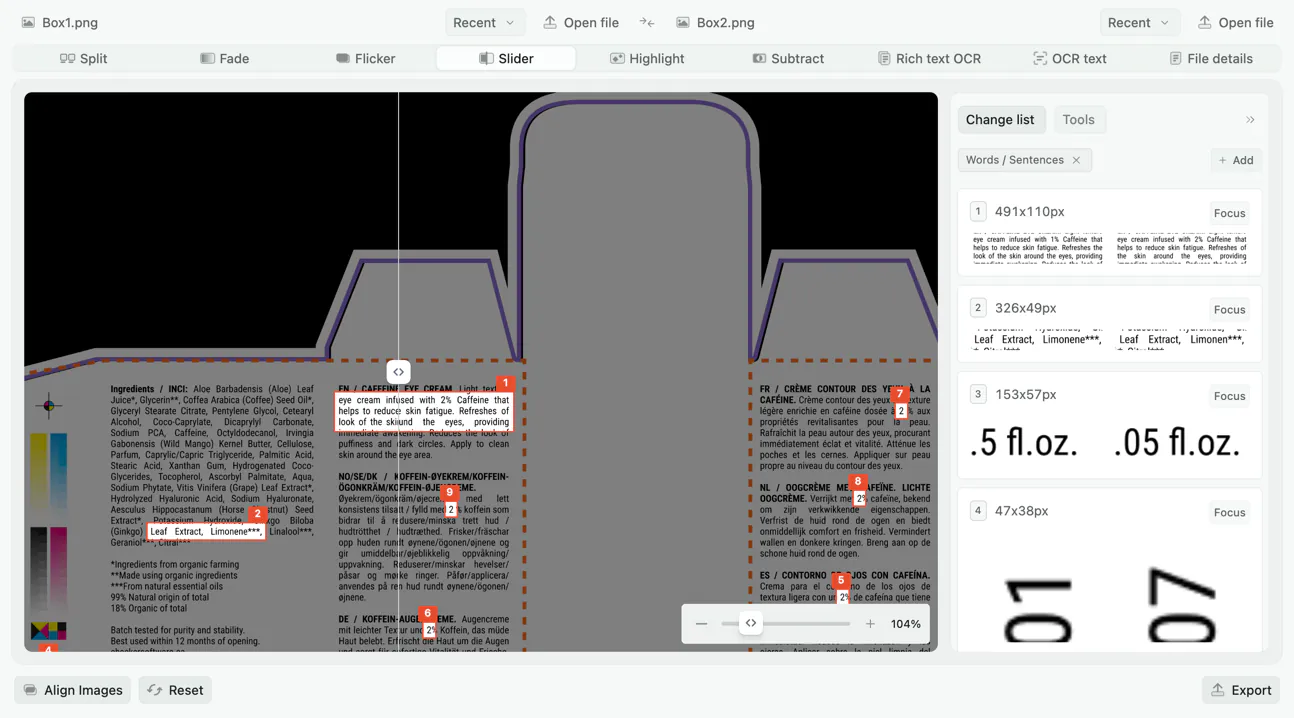
Slider view
Drag a divider across the pair to reveal one image beneath the other. The classic before-and-after, best for retouching and design revisions.
Split view
Both images side by side with synchronized zoom and pan. Zoom into a corner of one and the other follows, so you are always looking at the same region of both.
Fade view
Cross-dissolves one image into the other on a slider you control. Ease it back and forth and a change appears and disappears in place.
Flicker view
Alternates rapidly between the two images in place, so anything that moved appears to jump.
Subtract view
Subtracts one image from the other pixel by pixel. Identical areas render flat black and any difference glows, including differences too faint to see side by side.
Highlight view
Marks every changed pixel on the image itself, either in context over a grayscale copy or on its own as red and green on white.
Compare text inside images
Reads the words out of both images and compares them as text, for when the change is in what the image says rather than how it looks.
Rich text OCR
The same text comparison, with the recognized words kept in their original positions on the page rather than reflowed into one column.
File details and EXIF
Compares the metadata rather than the image: dimensions, file size, format, color profile, and the EXIF data stored in the file.
No sign-up to compare
Drop two images and compare immediately. An account is only needed to save, share, or upgrade.
No file size limits
Compare full-resolution exports without being asked to downscale them first.
PDF pages too
Drop in a PDF and choose one page to compare as an image. Use document compare when you need to check every page.
Align the images before you compare
Two photos of the same page, or two screenshots taken at different scroll positions, rarely land on the same pixels. Alignment moves one image onto the other first, so the comparison reports what changed in the content rather than where the frame sits.
Automatic alignment
One click matches the detail the two images have in common and solves for the offset, rotation, and scale between them. When the two files load at different resolutions, Diffchecker offers to run it for you.
Manual adjustment
Nudge, rotate, scale, and flip either image by hand, with the two overlaid at an opacity you set so you can watch them meet. Undo alignment puts both back where they started.
Choose what is allowed to move
Allow rotation, scale, and perspective warp together, or restrict alignment to the ones you want. Warp flattens a page photographed at an angle, and turning scale off keeps two exports at their own sizes.
The change log
Highlight view does more than tint the pixels that differ. It groups them into regions, draws each one on the image, and lists them beside it, so a comparison arrives as a list of changes to work through.
A list you can step through
Every region gets a numbered entry with a crop of it from both images. Select one to bring it into view, hide the boxes when you want to look at the image itself, or darken everything outside them.
Tune what counts as a change
Four settings decide what a scan reports: how different a pixel has to be, how far apart changed pixels can sit and still merge into one region, the smallest region worth keeping, and the largest before it is split up. Presets cover tiny specks, words and sentences, and large graphic blocks. You can also save your own.
Scan more than once
Add a second scan at different settings and its regions join the same list, so a page with both fine text edits and large graphic changes is covered in one comparison.
How to compare two images online
- 1
Add the original image
Drag it onto the left panel, or click to browse. JPG, PNG, WebP, GIF, HEIC, and PDF all work.
- 2
Add the changed image
Do the same on the right. The two images do not need to be the same size or the same format.
- 3
Pick a view
Start with split or highlight, then try slider, fade, flicker, or subtract depending on what you are looking for.
- 4
Export or share
Export the comparison as a PNG, or save it and send a link.
Why Diffchecker?
Most tools tint the pixels that differ and leave the rest to you. Diffchecker turns those pixels into a change log: changed regions are grouped, drawn on the image, and listed beside it, so you work through a list of differences instead of hunting for them.
- A numbered change log, with a preview of every changed region and a click to jump to it
- Detection settings you can tune, from tiny specks to large graphic blocks, and save as presets
- Alignment that corrects offset, scale, and rotation, so a shifted image is not reported as entirely changed
- Wide format support: JPG, PNG, WebP, GIF, HEIC, and PDF
- Export the result as a PNG to attach to a ticket or a review
Encrypted in transit
All traffic between your browser and Diffchecker is encrypted with TLS.
Offline on Desktop
Diffchecker Desktop compares files on your machine with no internet connection.
Independently certified
Your files are handled under an information security program certified to ISO/IEC 27001.
Visit our Trust Center
What people compare with Diffchecker
Designers and photographers
- Check a retouched photo against the original frame
- Compare two rounds of a design revision
- Verify an export matches the source file at full resolution
- Confirm a color profile change did not shift the image
QA and engineering
- Compare UI screenshots before and after a release
- Spot a layout shift between two browser renderings
- Check that an asset optimization pass did not degrade quality
- Diff two rendered charts from the same data
Print, publishing, and archives
- Compare two print proofs page by page
- Check a scanned page against a corrected reprint
- Verify a document scan matches the version on file
- Compare EXIF data to confirm provenance
Formats you can compare
The two images do not need to match in type, size, or resolution. A PNG can be compared against a JPG, or a full-resolution export against a downscaled copy, with alignment to bring them onto the same footing first.
Photographic formats
What cameras and phones produce, with EXIF data preserved for the file details view.
- .jpg
- .jpeg
- .heic
Web and design formats
Screenshots, UI captures, and optimized web assets, comparable across formats.
- .png
- .webp
- .gif
PDF pages
Choose one page from a PDF to compare as an image. Use document compare for a multi-page comparison.
No file size limit. Very large images take longer to render, and Diffchecker Desktop is faster because it runs locally.
Getting a cleaner comparison
Image comparison goes wrong in a few predictable ways, and nearly all of them amount to the same content no longer being in the same place.
Everything is marked as changed
Align the images first. Open Align Images and run Auto Align, or take the prompt Diffchecker offers when the two files have different resolutions.
Faint differences everywhere
Read it in subtract view. Recompression and color profile changes show as even low-level noise across the frame, while a real edit shows as a bright, localized region.
You know something moved but cannot see what
Use flicker. A displaced element jumps while the rest of the frame holds still, and fade held at the midpoint does the same job, showing the move as a ghosted double edge.
The change is in the words, not the picture
Switch to OCR text. A corrected price or a changed date is a text change stored as pixels, and comparing it as text tells you which words differ.
The images look identical
Check file details. Two images can match pixel for pixel and still differ in dimensions, color profile, compression, or EXIF data.
Trusted by teams and independently certified
- Intuit
- Lyft
- National Geographic
- Salesforce
- The Wall Street Journal
- Congressional Budget Office
- Zoom
- Dow Jones
ISO/IEC 27001 certified
Our information security management system is independently audited and certified. View the certificate in our Trust Center.
“I originally signed up for Diffchecker for some extra functionality I needed. I've used it ever since to check API response differences, debug outputs, and compare code and data when testing.”
Abdull AhmedSenior Software Engineer, Hubspot
Frequently asked questions about comparing images
Yes. When the two files have different resolutions Diffchecker offers to align them, and you can run alignment yourself at any point. It corrects offset, scale, and rotation, which stops a shifted or rescaled screenshot from reading as entirely changed.
Start with highlight if you want a list of what changed, or split if you want to read both images. Use slider or fade to show someone else the change. Use flicker to find something that moved. Use subtract to prove two images are pixel-identical. Use OCR if the change is in the text rather than the picture.
The comparison runs in your browser, and nothing is published or shared. Nobody else can see it unless you save the comparison and share the link. Diffchecker Desktop runs the same comparison offline.
Yes. File details view compares dimensions, file size, format, and color profile. It also reads the EXIF data stored in the file, including camera make and model, orientation, and capture date.
Yes, as a PNG: free to try, unlimited on Pro. You can also save it with a free account and share a link.
More ways to compare with Diffchecker
Compare text
Compare text and code with word-level and character-level highlighting, syntax coloring, and merge.
Compare documents
Compare Word documents, PDFs, and presentations, including a PDF against a Word file, with formatting and moved-content detection.
Compare spreadsheets
Compare XLSX, XLS, CSV, TSV, and ODS files cell by cell, with formula change detection.
Compare on the desktop
Compare whole folders and work fully offline on Windows, Mac, and Linux with the desktop app.
Compare without the browser
Diffchecker Desktop compares text, documents, images, spreadsheets, and whole folders on your machine, offline.
Try for Free!
14-day trial
No credit card required